

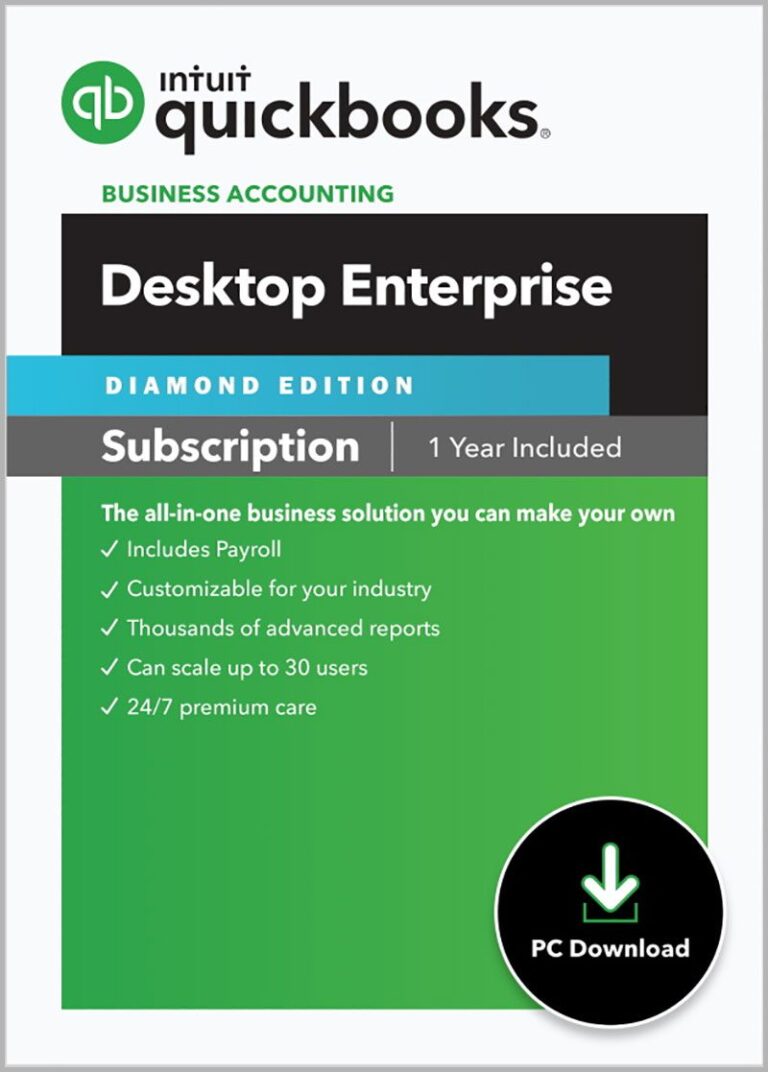


QuickBooks Enterprise 2024 Silver Desktop Edition | Monthly Subscription
The most flexible version of QuickBooks includes additional features that small businesses need in accounting software.
Choose Subscription Plan
Payment Frequency
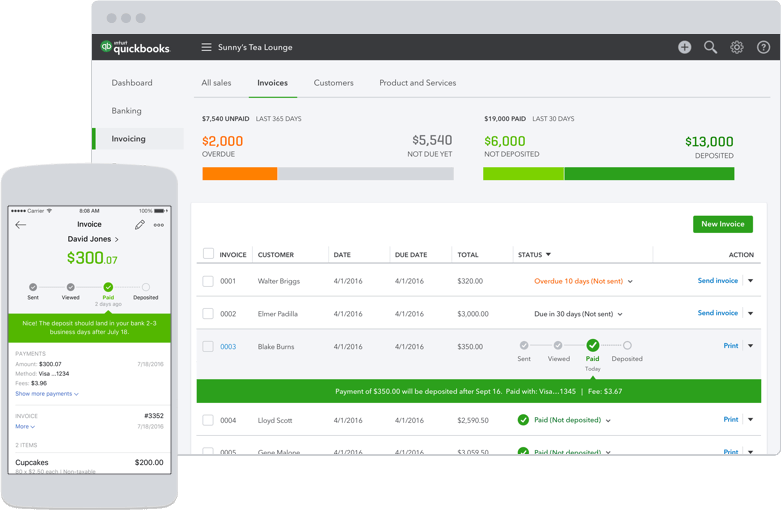
Included Free! Accept credit cards and ACH electronic checks from emailed invoices, over the phone, online stores and mobile devices that all reconcile in your QuickBooks automatically.
Terms
Purchase and any sales tax where applicable will be billed by Intuit and includes 60 Day Money Back Guarantee. Annual payment option not available for Diamond or Hosted Enterprise subscriptions.
QuickBooks Enterprise 2024—Built for growth with advanced controls and industry-specific features.
Watch the videos to see the new features in QuickBooks Enterprise 2024
The new QuickBooks Enterprise for 2024 gives you a whole new level of flexibility with the same familiar QuickBooks look and feel.
Build your business without giving up control
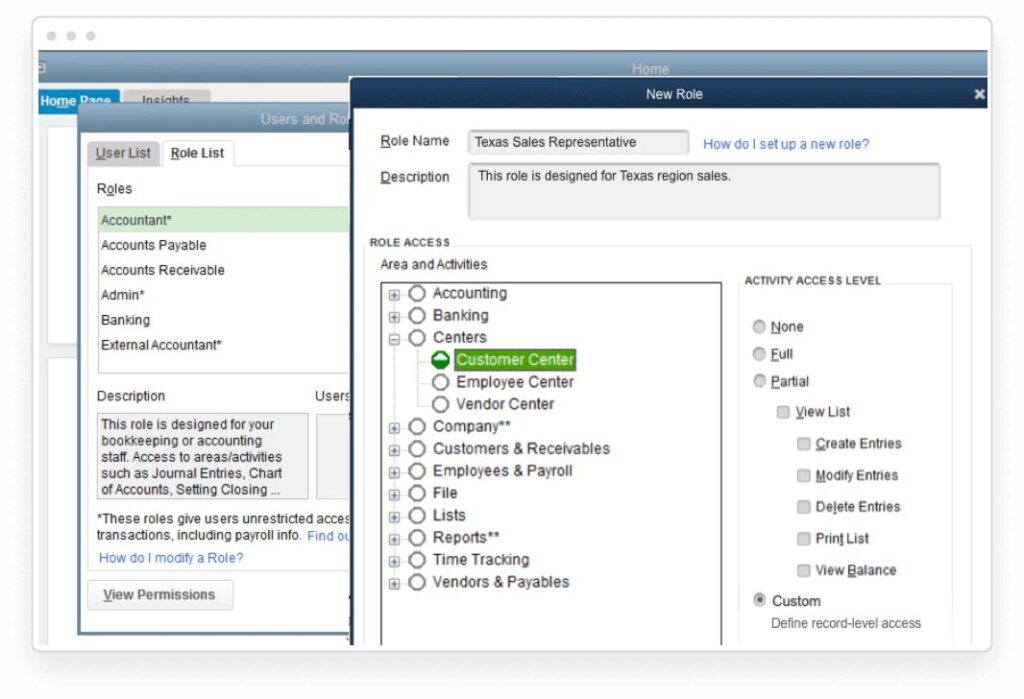
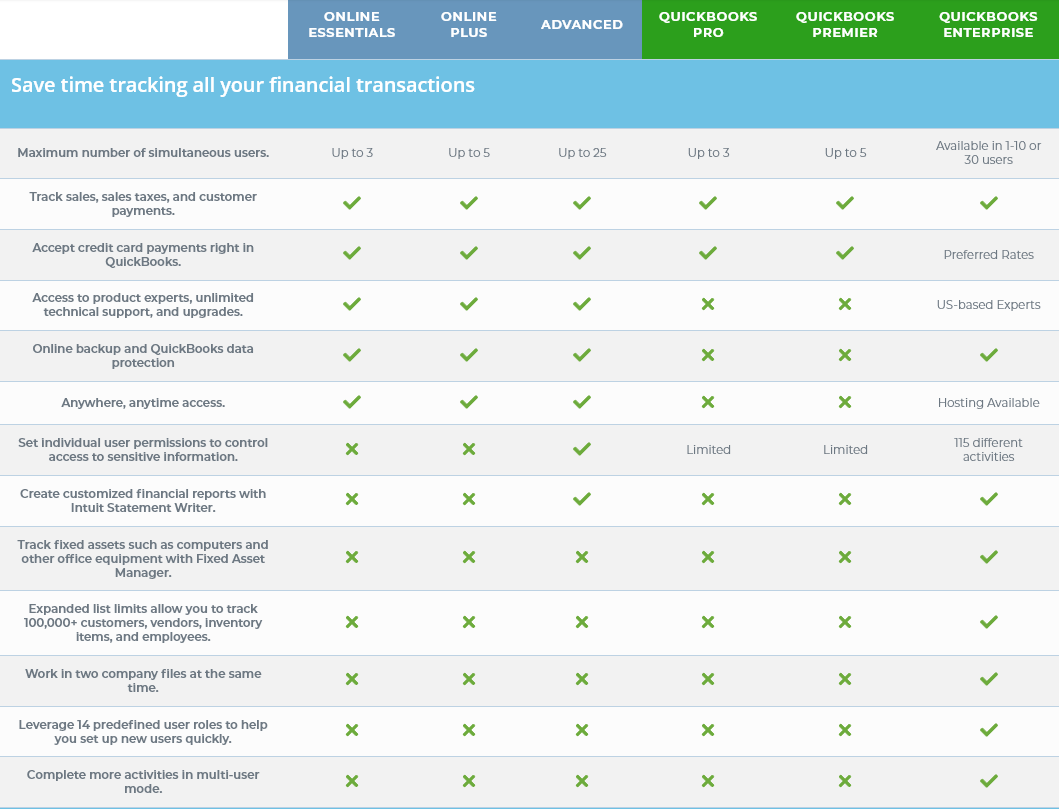
QuickBooks Enterprise 2024 scales from 1 up to 40 individual users. Users can work at the same time with more activities in multi-user mode and 14 predefined user roles will help you set up new users quickly.
Room to grow with your business
Don’t worry about losing historical business information or maxing out your data. The new QuickBooks Enterprise Solutions has more than 6 times the capacity of any other QuickBooks product allowing for up to 1 million items, users, and vendors. And now with the 64-bit increased search speed in Enterprise 2024, you can find your data 60% faster than ever before.
Tailored to your industry
The industry-focused editions give you tools and reporting built with your business in mind. Specialized industries include Contracting, Manufacturing, Wholesale, Retail, Non-Profit, Professional Services, and Accountant. In addition, you can further expand QuickBooks Enterprise with additional apps from our apps library.
Take control with Advanced Inventory
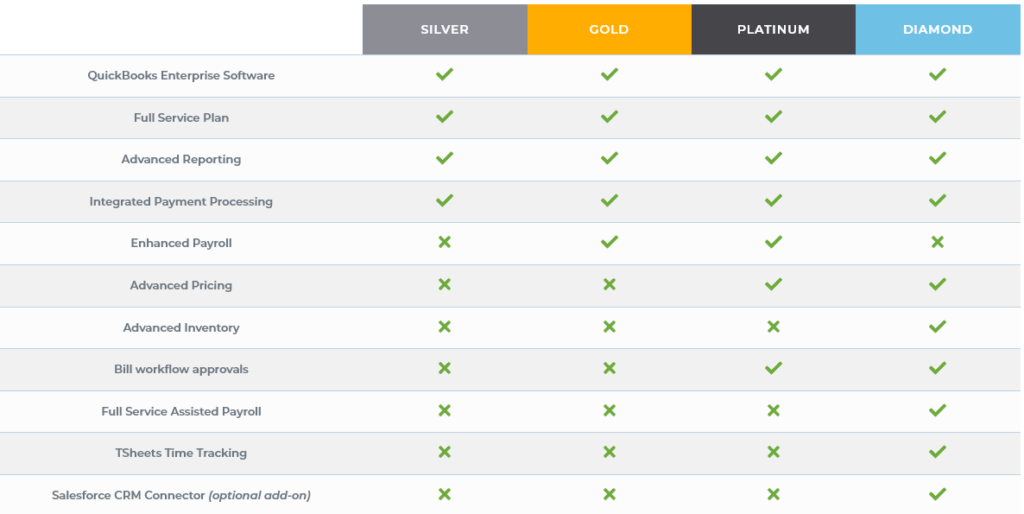
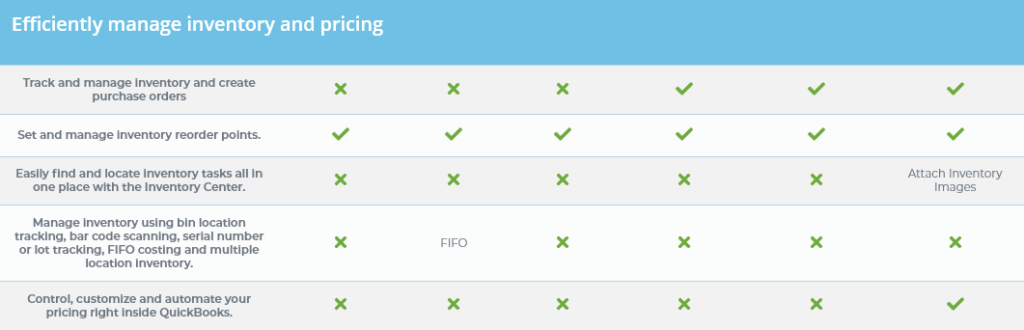
With the Advanced Inventory functionality found in the Enterprise Platinum and Diamond editions, you can automate inventory and order management from the warehouse to your customer’s doorstep. It gives you the visibility to adapt, reorder, and take care of your customers quickly. Work across multiple warehouses, track by bin location, lot, or serial number, and then transfer inventory to multiple sites if needed. Built-in mobile barcode scanning allows you to automate receiving, picking, and track inventory across your entire organization as well as manage sales orders from one dashboard in Enterprise.
Execute pricing strategies with ease
The Advanced Pricing module found in QuickBooks Enterprise Platinum and Dimond editions allows you to simplify the complexity of pricing with customizable and automated price rules. No more manually calculating customer price changes or exceptions and you can even apply multiple rules at the same time and or override specific rules on the spot. Additionally, by setting up quantity discounts, manufacturer markdowns ,and rules for high value customers in advance, you can stay quick and efficient while eliminating errors and mistakes along the way.
Unlimited growth and scalability
Need something specific for your business? No problem. Because QuickBooks is the #1 Enterprise accounting software, there are hundreds of 3rd party apps and add-on’s designed solve your specific needs. No need to have multiple solutions or spend time and money developing your own workarounds. Just choose the exact functionality you need and get back to work.
Get paid easily and quickly
When you turn on QuickBooks Enterprise Payments, you’ll have the ability to put a “Pay Now” link on every invoice you send. Customers can click and pay instantly with any major credit card or a bank transfer. And, since QuickBooks Enterprise Solutions updates itself automatically and sends payments directly to the bank, you’ll always have the most current information on your bottom line. Fewer mistakes, less work, and less worry.
QuickBooks Enterprise Hosted, our most flexible solution
With our cloud-hosted version of QuickBooks Enterprise, you and your employees can have the freedom to work remotely from any computer.
Access Enterprise anytime and anywhere
With our QuickBooks Desktop Enterprise with Hosting, you get the same, great business management software, plus the convenience of accessing it anytime, anywhere, and from any platform. It’s our most flexible Enterprise yet and is the perfect solution if you are looking to:
Allow employees to work remotely or out in the field.
Have the flexibility of using either a Mac or PC operating system.
Avoid the costly expense or purchasing and maintaining an “on premise” server system.
Have peace of mind of knowing that your data is redundant, secure, and 24/7 technical support is just a phone call away.
QuickBooks Enterprise Hosted, our most flexible solution
Our Enterprise Full Service Plan, included for free with your Enterprise subscription, comes with dedicated priority support plus key tools and features to make sure that you are always on top of your game.
Free Priority Circle Membership
As an Enterprise customer, you are automatically a member in Priority Circle, which gives you a dedicated Customer Success Manager to address your specific business needs and questions, Priority Care to move your calls toward the front of the line with our top-performing customer care agents, and complimentary online product training valued at $3000.
QuickBooks Enterprise 2024 offers three feature-filled subscription packages. Just choose the one that's best for you.
QuickBooks Enterprise 2024 gives you the flexibility of three custom subscription packages each with unique features to help fit your individual business needs. In addition, each package includes the Enterprise Full Service Plan at no extra charge. This gives you free, unlimited U.S. based technical support, online backup, QuickBooks data conversion and recovery, in-depth online training, and a free upgrade to the next edition of Enterprise.
QuickBooks Enterprise Productivity Add-Ons
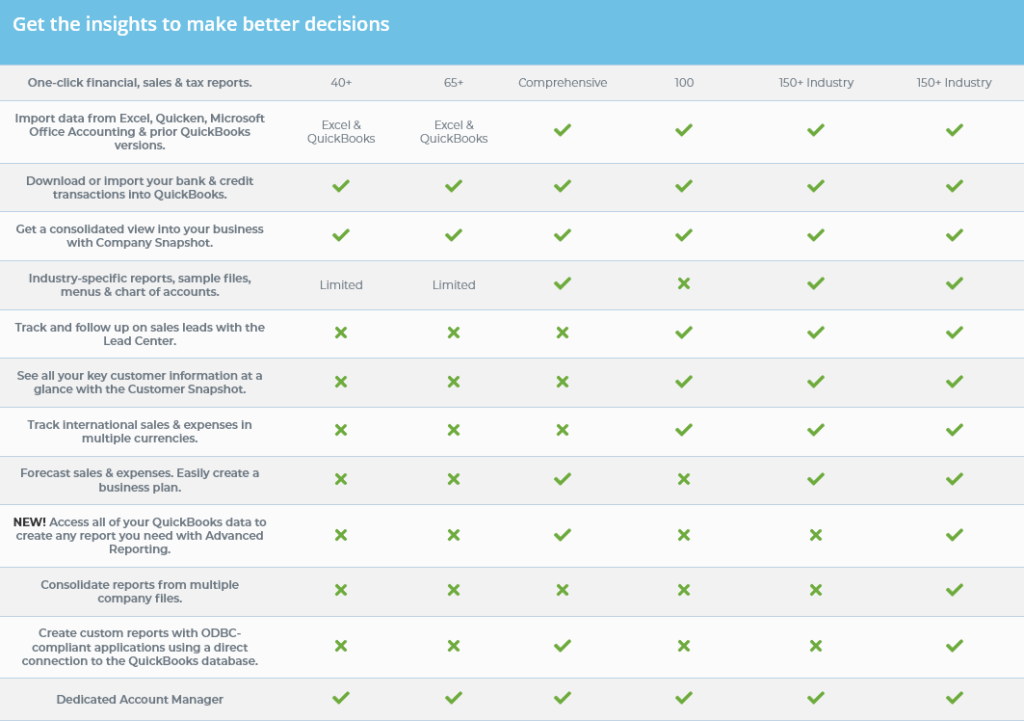
Whether you're just starting out or your business is growing, there's a QuickBooks that fits your needs. Learn how different versions compare with this easy-to-use QuickBooks comparison chart.
Minimum System Requirements For QuickBooks Enterprise 2024
- 2.4 GHz processor
- 4 GB of RAM (8 GB recommended)
- Minimum 2.5 GB available disk space (additional space required for data files) for client and server
Windows File Server Requirements
- Windows 8.1 Update 1, or Windows 10 update/version supported by Microsoft
- Windows Server 2012 (or R2), 2016, or 2019
- Don’t want to buy a server? We can take care of it for you with QuickBooks Hosting Solutions.
Additional Hardware and Software Requirements
- Optimized for 1280×1024 screen resolution or higher. Supports one Workstation Monitor, plus up to 2 extended monitors. Optimized for Default DPI settings.
- 4x DVD-ROM drive (unless the user is downloading from Intuit server)
- Enterprise subscriptions, payroll, and online features require Internet access (1 Mbps recommended speed)
- Internet Explorer 11 (32-bit)
- QuickBooks Desktop App requires an active Enterprise subscription. Must be installed on a camera-enabled mobile device using Android 5.0 or iOS 12 or later.
Integration with Other Software
- E-mail Estimates, Invoices, and other forms with Microsoft Outlook 2013-2019, Microsoft Outlook with Office 365, GmailTM, and Outlook.com®, other SMTP-supporting e-mail clients. Integration with QuickBooks POS 12.0, 18.0 or 19.0.
- Microsoft Word and Excel integration requires Office 2013-2019, or Microsoft 365 (32 and 64 bit)
- Transfer data from Quicken 2016-2020, QuickBooks Mac 2016-2021, and Microsoft Excel 2013-2019, Microsoft 365 (32 or 64 bit)
- Compatible with QuickBooks Point of Sale version 12.0 and later
Getting Started With QuickBooks Enterprise Silver
Product Features
In addition to the differences in features in other desktop products like QuickBooks Pro and QuickBooks Premier, QuickBooks Desktop Enterprise comes with five key benefits that extend beyond the software features.
Dedicated Enterprise Support Team
With Priority Circle VIP support included in all versions of QuickBooks Enterprise, you get an account team that is dedicated to assisting you with everything from product setup to workflows best suited for your business. Plus, when you purchase your Enterprise from us, you also get free unlimited support, product and app consultation, and a dedicated account manager for the life of your license.
Free Product Upgrades and Version Protection
Your Enterprise subscription gives you access to all product updates and the newest version of Enterprise as soon as it is released. This ensures that you are always using the latest and greatest version of the software and have the most current features available.
QuickBooks Enterprise Automated Backup Service
Never worry again about losing your critical financial data. With the QuickBooks Enterprise online data back-up and restore service, your last 45 days of data are automatically backed up off-site on private Intuit servers where you can safely access it at any time. Additionally, you get up to 100GB of data space so you can successfully back up data even if you have an extra large company file.
Data Recovery Service
Where the online backup service is there to make sure that you don’t lose any data, the Enterprise Data Recovery Service ensures that if there is a problem, your data is safe and secure. If anything happens like a hard disk crash or a forgotten password, the recovery team will help you put everything back and get you up and running again. They even include 2 day expedited service at no additional charge.
On-Demand QuickBooks Training
Take advantage of $3,000 worth of online, self-paced QuickBooks training courses and webinars. You get access to over 16 hours of short but detailed training videos that will walk you through every aspect of your Enterprise software. Plus, if you ever have any questions, you can contact us directly as well.
If you have questions on anything related to QuickBooks Enterprise, just give our experts a call at 866-949-7267 and we can help. If you would like to try QuickBooks Desktop Enterprise free for 30 days, just click the free trial link below, and we will send you a full-access copy so that you can test drive it for yourself.

If you have questions on support or anything else related to QuickBooks Enterprise, just give our experts a call at 866-949-7267 and we can help. If you would like to try QuickBooks Enterprise free for 30 days, just click the free trial link below, and we will send you a full-access copy so that you can test drive it for yourself.
Yes. QuickBooks Desktop Enterprise has an industry edition built for Contractors. All versions of QuickBooks Enterprise Desktop come with the contractor version included and it can be easily turned on or changed from within the help menu. The Enterprise Contractor Edition allows you to organize job costs by the vendor and see who still needs to be paid as well as create job estimates and track change orders. In addition, you can analyze profitability from a task level with customized job cost reports.
You can see all the built-in features included for contractors by clicking here
Many contracting companies combine this industry edition with the payroll and time tracking features included in QuickBooks Enterprise Diamond to create a full solution that automates everything in one package. To learn more about Diamond Enterprise, click here.
If you have questions on the Enterprise Contractor Edition or anything else related to QuickBooks Enterprise, just give our experts a call at 866-949-7267 and we can help. If you would like to try QuickBooks Enterprise free for 30 days, just click the free trial link below, and we will send you a full-access copy so that you can test drive it for yourself.
Yes. QuickBooks Desktop Enterprise has an industry edition built for Manufacturing and Wholesale. All versions of QuickBooks Enterprise Desktop come with this version included and it can be easily turned on or changed from within the help menu. The Enterprise Wholesale and Manufacturing Edition allows you to produce, manage, and distribute your products right in QuickBooks. Additionally, you can keep your inventory management and sales fulfillment on track, find more efficiencies in your builds, automate more inventory processes, and track costs from raw materials to finished goods.
You can see all the built-in features included for manufacturing by clicking here
Many manufacturing companies combine this industry edition with the payroll and time tracking features included in QuickBooks Enterprise Diamond to create a full solution that automates everything in one package. To learn more about Diamond Enterprise, click here.
If you have questions on the Enterprise Manufacturing Edition or anything else related to QuickBooks Enterprise, just give our experts a call at 866-949-7267 and we can help. If you would like to try QuickBooks Enterprise free for 30 days, just click the free trial link below, and we will send you a full-access copy so that you can test drive it for yourself.
Yes. QuickBooks Desktop Enterprise has an industry edition built for wholesale and distribution. All versions of QuickBooks Enterprise Desktop come with the wholesale version included and it can be easily turned on or changed from within the help menu. The Enterprise Wholesale and Distribution Edition allows you to manage purchasing, distribution, inventory, and sales order fulfillment as well as streamline order management with apps like Shopify, Amazon, or WooCommerce. Additionally, you can use mobile barcode scanning (included in the Platinum and Diamond subscriptions) for picking, receiving, and cycle count inventory updates and track project costs with landed cost calculations, and track all your vendors in one place.
You can see all the built-in features included in this edition by clicking here
Many wholesale companies combine this industry edition with the payroll and time tracking features included in QuickBooks Enterprise Diamond to create a full solution that automates everything in one package. To learn more about Diamond Enterprise, click here.
If you have questions on the Enterprise Wholesale and Distribution Edition or anything else related to QuickBooks Enterprise, just give our experts a call at 866-949-7267 and we can help. If you would like to try QuickBooks Enterprise free for 30 days, just click the free trial link below, and we will send you a full-access copy so that you can test drive it for yourself.
Yes. QuickBooks Desktop Enterprise has an industry edition built for Nonprofits. All versions of QuickBooks Enterprise Desktop come with the nonprofit version included and it can be easily turned on or changed from within the help menu. The Enterprise Nonprofit Edition customizes fields to set up Enterprise specifically for your industry and allows you to create year-end donation statements to track contributions from your biggest donors as well as identify your expenses to present to your board and create your Form 990 for the IRS.
You can see all the built-in features included for nonprofits by clicking here
Nonprofit companies can also combine this industry edition with the payroll and time/project tracking features included in QuickBooks Enterprise Diamond to create a full solution that automates everything in one package. To learn more about Diamond Enterprise, click here.
If you have questions on the Enterprise Nonprofit Edition or anything else related to QuickBooks Enterprise, just give our experts a call at 866-949-7267 and we can help. If you would like to try QuickBooks Enterprise free for 30 days, just click the free trial link below, and we will send you a full-access copy so that you can test drive it for yourself.
Yes. QuickBooks Desktop Enterprise has an industry edition built for Professional Service companies. All versions of QuickBooks Enterprise Desktop come with this version included and it can be easily turned on or changed from within the help menu. The Enterprise Services Edition allows you to track unbilled time and expenses by employee, project, client, or service and send invoices in just a few clicks. It also includes the ability to pay and get paid the right amount by setting different billing rates as well as analyzing profitability by project and client.
You can see all the built-in features included for professional service companies by clicking here
Many professional service companies combine this industry edition with the payroll and time tracking/project features included in QuickBooks Enterprise Diamond to create a full solution that automates everything in one package. To learn more about Diamond Enterprise, click here.
If you have questions on the Enterprise Professional Services Edition or anything else related to QuickBooks Enterprise, just give our experts a call at 866-949-7267 and we can help. If you would like to try QuickBooks Enterprise free for 30 days, just click the free trial link below, and we will send you a full-access copy so that you can test drive it for yourself.
Yes. QuickBooks Desktop Enterprise has an industry edition built for retail. All versions of QuickBooks Enterprise Desktop come with the retail version included and it can be easily turned on or changed from within the help menu. The Enterprise Retail Edition allows you to track sales accurately and flexibly with the Sales Summary Form as well as stay on top of inventory and set reorder points and easily compare one month’s profit and loss against another’s. If you sell online, you can add integrations with marketplaces like Shopify, Amazon, and eBay with addon 3rd party integrations as well as manage inventory with mobile bar code scanning and set custom pricing rules (included in the QuickBooks Enterprise Diamond and Platinum editions).
You can see all the built-in features included for retailers by clicking here
Many retail companies combine this industry edition with the payroll, inventory, and pricing rule features included in QuickBooks Enterprise Diamond to create a full solution that automates everything in one package. To learn more about Diamond Enterprise, click here.
If you have questions on the Enterprise Retail Edition or anything else related to QuickBooks Enterprise, just give our experts a call at 866-949-7267 and we can help. If you would like to try QuickBooks Enterprise free for 30 days, just click the free trial link below, and we will send you a full-access copy so that you can test drive it for yourself.
Yes. QuickBooks Desktop Enterprise has an industry edition built for Accountants. The Enterprise Accountant Edition adds key features like the ability to classify hundreds of transactions at once, fix incorrectly recorded sales tax payments, clear up the undeposited funds’ account, identify changes made to list items from a single window, and more. You can even make it faster and easier to work with your client’s QuickBooks files with version control, storing client passwords, organizing QuickBooks files by the client, and upgrading QuickBooks clients’ files in batches with the QuickBooks File Manager.
You can see all the built-in features included for accountants by clicking here
If you have questions on the Enterprise Accountants Edition or anything else related to QuickBooks Enterprise, just give our experts a call at 866-949-7267 and we can help. If you would like to try QuickBooks Enterprise free for 30 days, just click the free trial link below, and we will send you a full-access copy so that you can test drive it for yourself.
Data And Account Settings
Yes. QuickBooks Desktop Enterprise Accountant Edition is designed to help accountants support customers using QuickBooks Desktop Enterprise.
If you would like to get a copy of the Accountant version or have any questions related to QuickBooks Enterprise, just give our experts a call at 866-949-7267 and we can help. If you would like to try QuickBooks Enterprise free for 30 days, just click the free trial link below, and we will send you a full-access copy so that you can test drive it for yourself.
To maximize multiple-user productivity, QuickBooks Desktop Enterprise multi-user mode is optimized for Microsoft® Windows 2008 Server and later client-server networks. You also now have the option of hosting your database server on a Linux operating system. QuickBooks Desktop Enterprise is also Remote Desktop Services compliant.* You can centrally locate QuickBooks Desktop Enterprise on a single server and provide access to your multiple users via the LAN or WAN for remote locations. As a result, you don’t have to install QuickBooks Desktop Enterprise on each user’s PC and you can maximize performance over lower bandwidth connections.
In addition, you have the option to purchase QuickBooks Desktop Enterprise with Hosting, powered by Right Networks. For more info, please click here for the details.
If you have questions on system requirements or anything related to QuickBooks Enterprise, just give our experts a call at 866-949-7267 and we can help. If you would like to try QuickBooks Enterprise free for 30 days, just click the free trial link below, and we will send you a full-access copy so that you can test drive it for yourself.
The current system requirements and technical specifications for QuickBooks Enterprise 2023 are listed below. These requirements can change from time to time so if you would like to make sure that you have the latest data, please call us at 866-949-7267 and we can make sure that you have the most up-to-date information.
System requirements
- Windows 10 (64 bit), or Windows 11, update/version supported by Microsoft. Windows 8.1 and Linux are not supported.
- Server: Windows Server 2012 (or R2), 2016, 2019, or 2022 (Regular or Small Business Server)
- 2.4 GHz processor
- Client RAM: 8 GB RAM; 16 GB recommended
- Server RAM (for multi-user support): 8 GB (5 users); 12 GB (10 users); 16 GB (15 users); 20 GB (20+ users)
- 2.5 GB disk space recommended (additional space required for data files); Solid State Drive (SSD) recommended for optimal performance
- Enterprise subscriptions, payroll, and online features require Internet access
- QuickBooks Desktop App is included with Desktop subscriptions. Must be installed on a camera-enabled mobile device using Android 6.0 or iOS 12 or later.
- Product registration required
- Optimized for 1280×1024 screen resolution or higher. Supports one Workstation Monitor, plus up to 2 extended monitors. Optimized for Default DPI settings.
Integration with other software
- Microsoft Word and Excel integration requires Office 2013-2021, or Microsoft 365 (32 and 64 bit)
- E-mail Estimates, Invoices, and other forms with Microsoft Outlook 2013-2019, Microsoft 365, GmailTM, and Outlook.com®, other SMTP-supporting e-mail clients. Integration with QuickBooks POS 19.0.
- Transfer data from Quicken 2016-2022, QuickBooks Mac/Plus 2016-2023 (US only), Microsoft Excel 2013-2021, Microsoft 365 (32 or 64 bit)
Browser requirement
- Google Chrome
Data management
- Uses AES-1288 for data encryption for all PCI and PII data
Operational security
- PCI PA-DSS certified, assessed annually as a payment application
- Remainder is not applicable as the program is installed in the customer environment and no data is stored on Intuit systems
If you have questions on QuickBooks system requirements or anything related to QuickBooks Enterprise, just give our experts a call at 866-949-7267 and we can help. If you would like to try QuickBooks Enterprise free for 30 days, just click the free trial link below, and we will send you a full-access copy so that you can test drive it for yourself.
If you’re using other financial software, you can import information into QuickBooks as long as that software allows you to export to a spreadsheet or text file. You can import lists that correspond to QuickBooks lists, budgets, and individual transactions.
Free conversion and migration assistance for Enterprise
If you are looking to convert data from an outside accounting program or from another QuickBooks product, we can help. With an active subscription to QuickBooks Enterprise, we can walk you through the process of moving basic data from programs like Sage, Excel, or even products like QuickBooks Online to Desktop Enterprise and can help you choose the best data migration option for you.
Need a custom migration solution?
If you need a custom solution or specific data converted that is not included in a basic conversion process, just let us know and we can get you to data conversion specialists that can help you get it transferred for a nominal fee and even recommend some popular tools so that you can do-it-yourself.
Need to convert data from QuickBooks Desktop Pro or Premier to Enterprise?
If you are looking to migrate your company files from desktop Pro or Premier to QuickBooks Enterprise, we can walk you through the steps of cleaning and preparation as well as the actual conversion at no cost. Just give our experts a call at 866-949-7267 and we can set up a consultation time for you to discuss your situation.
If you have questions on anything related to QuickBooks Enterprise, just give us a call at 866-949-7267 and we can help. If you would like to try QuickBooks Enterprise free for 30 days, just click the free trial link below, and we will send you a full-access copy so that you can test drive it for yourself.
Yes! If you want to transfer your data and company files from QuickBooks Pro, QuickBooks Premier, or QuickBooks for Mac, we can help you with the steps to prepare your data as well as the conversion all at no charge. Just give our experts a call at 866-949-7267.
If you have questions on data migrations or anything else related to QuickBooks Enterprise, just give our experts a call at 866-949-7267 and we can help. If you would like to try QuickBooks Enterprise free for 30 days, just click the free trial link below, and we will send you a full-access copy so that you can test drive it for yourself.
Yes! We stand behind QuickBooks Desktop Enterprise with a money-back satisfaction guarantee. If you’re not satisfied, just let us know within 60 days and we will refund your full purchase price so you can try out QuickBooks Desktop Enterprise with no risk whatsoever.
If you have questions on inventory or anything related to QuickBooks Enterprise, just give our experts a call at 866-949-7267 and we can help. If you would like to try QuickBooks Enterprise free for 30 days, just click the free trial link below, and we will send you a full-access copy so that you can test drive it for yourself.