

QuickBooks Online Plus – Monthly Subscription
Includes income and expense tracking, invoicing, bill management, and time tracking PLUS inventory and projects for up to 5 users
Choose Subscription Plan
Choose Subscription Plan
Maximize your business's financial potential with QuickBooks Online Advanced

Drill down to see the details behind the numbers, and export your reports and all of your QuickBooks formatting to Excel.

Easily create invoices and sales receipts to keep track of who owes you money, what they bought, and when they paid you.

Quickly enter and pay bills from vendors, and download your bank and credit card transactions directly into QuickBooks.
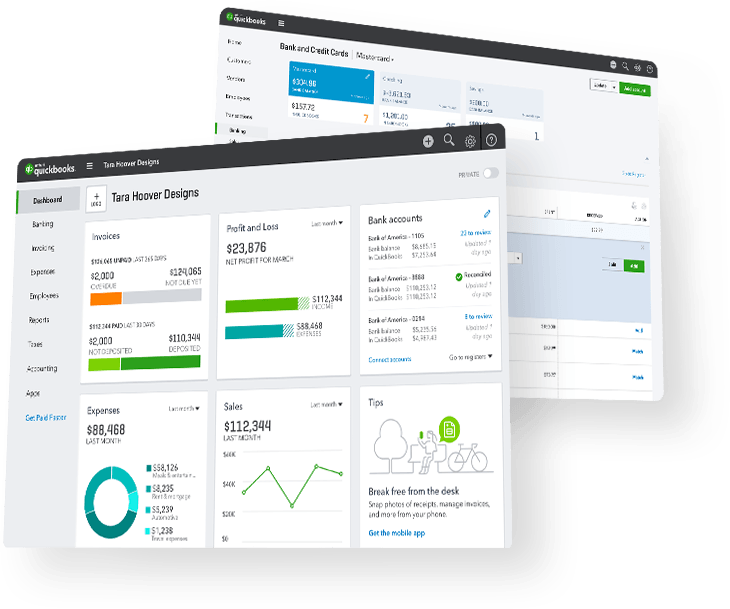
Simplify how you track your business finances so you can see the big picture

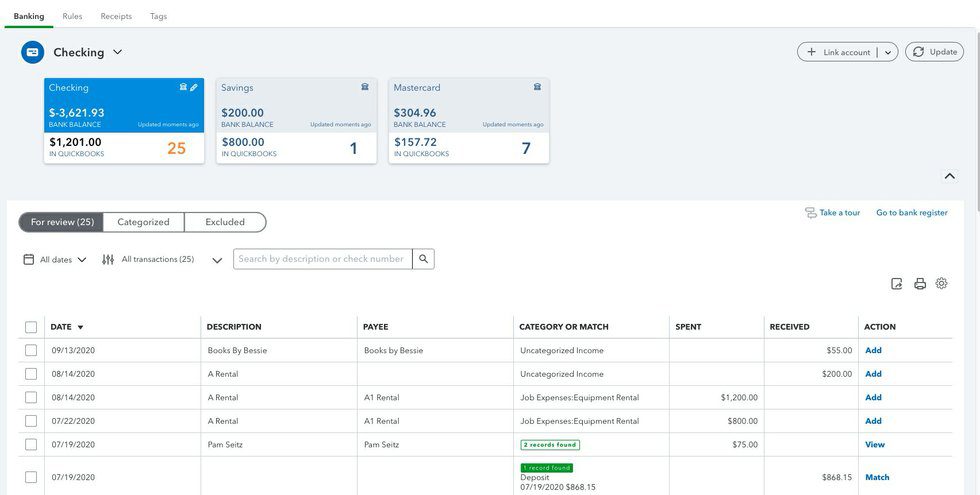
QuickBooks automatically pulls in data from your bank and credit card accounts, saving time and reducing data errors.

When you activate the payments feature, customers can pay by clicking a “pay now” invoice link or online.

Complete access to all your company financial data from any internet-capable device. Anytime, anywhere.
New dashboards and feeds instantly show you the health of your business and your next action steps.
Maximize your business's financial potential with QuickBooks Online Advanced
It only takes minutes to set up your QuickBooks Online and have everything customized for your specific type of business. The clean, streamlined feel makes it easy to find what you need, navigate through different functions, and access the information you need quickly. If you ever need help, you can get unlimited expert support and assistance 24/7 by phone or chat.
Sync Accounts Automatically
QuickBooks Online automatically pulls in data from your bank and credit card accounts, allowing you to seamlessly track your income, expenses, and reduce data entry errors. Over time, it learns from your behavior and can even classify transactions for you automatically. If your customers pay you through Intuit Payments, QuickBooks will sync, record, and automatically match them for you as well.
Maximize your business's financial potential with QuickBooks Online Advanced
- Tracking income and expenses
- Banking with 5.00% APY NEW!
- Bookkeeping automation NEW!
- Mileage tracking
- Receipt capture
- Tax deductions
- Cash flow tracking
- Sales and sales tax
- Create estimates
- Track 1099 contractors
- Connect 1 sales channel
- Tracking income and expenses
- Banking with 5.00% APY NEW!
- Bookkeeping automation NEW!
- Mileage tracking
- Receipt capture
- Tax deductions
- Cash flow tracking
- Sales and sales tax
- Create estimates
- Track 1099 contractors
- Connect 1 sales channel
- Tracking income and expenses
- Banking with 5.00% APY NEW!
- Bookkeeping automation NEW!
- Mileage tracking
- Receipt capture
- Tax deductions
- Cash flow tracking
- Sales and sales tax
- Create estimates
- Track 1099 contractors
- Connect 1 sales channel
- Tracking income and expenses
- Banking with 5.00% APY NEW!
- Bookkeeping automation NEW!
- Mileage tracking
- Receipt capture
- Tax deductions
- Cash flow tracking
- Sales and sales tax
- Create estimates
- Track 1099 contractors
- Connect 1 sales channel
Getting Started With QuickBooks Online Advanced
Getting Started With QuickBooks Online Advanced
What payment methods can I use to buy QuickBooks Online?
You can use any major credit card to purchase QuickBooks Online including Visa, MasterCard, Discover, or American Express in addition to using an electronic check or ACH. When doing a subscription such as QuickBooks Online, it is always best to link a checking account because credit cards expire and have the possibility of getting stolen where they would need to be canceled. If the card on file is no good and your subscription goes to renew, it will be deactivated and you will be locked out of the software with no access to your data. This is also why it is best to have your Quickbooks Online set to renew annually vs monthly. This way you only have the chance of a billing issue once per year vs 12x per year.
PRODUCT FEATURES
What payment methods can I use to buy QuickBooks Online?
You can use any major credit card to purchase QuickBooks Online including Visa, MasterCard, Discover, or American Express in addition to using an electronic check or ACH. When doing a subscription such as QuickBooks Online, it is always best to link a checking account because credit cards expire and have the possibility of getting stolen where they would need to be canceled. If the card on file is no good and your subscription goes to renew, it will be deactivated and you will be locked out of the software with no access to your data. This is also why it is best to have your Quickbooks Online set to renew annually vs monthly. This way you only have the chance of a billing issue once per year vs 12x per year.